
From 0 to 500 construction leads in one click: how we connected the SIRENE API to our CRM
The problem
Our CRM ezlead is built for field sales reps. They manage their prospects, follow-ups, and leads. But someone still had to hand them the prospects in the first place.
Done manually, that means hours on business directories, Excel exports, and copy-paste. Not great for a team that wants to scale.
The idea: automate company imports from official registries, filtered by department and industry. The result: an interface where the user picks "Construction, department 06", clicks, and finds 500 prospect records in their CRM.
The architecture: why two separate systems
We could have built everything in Next.js. We didn't.
The problem with the "all-in-one" approach: the SIRENE API can return hundreds of results per NAF code. With pagination, enrichment, and deduplication, a single search can take 30 to 60 seconds. A Next.js Server Action with a 60s timeout is risky, and the UX is terrible.
Our architecture:
- Next.js (interface): the user configures their search (departments, NAF codes, company size) and clicks "Start". This just creates a job in the database with a
pendingstatus. The interface polls every 8 seconds. - Python script (processing): a local script (cron) reads
pendingjobs, queries SIRENE, and inserts companies directly into the database via the Supabase REST API.
This decoupling lets us restart the script without touching the interface, handle errors cleanly, and run the processing from any machine.
The SIRENE API
The SIRENE V3 API uses a direct API key in the X-INSEE-Api-Key-Integration header. No OAuth2, no token refresh.
headers = {
    "X-INSEE-Api-Key-Integration": API_KEY,
    "Accept": "application/json"
}
Simple and stable — refreshing.
The Lucene query: iterations
The SIRENE API uses Lucene queries for multi-criteria filtering. Simple in theory. In practice, we hit several surprises.
What doesn't work:
activitePrincipaleEtablissement:4120A→ 400 (wrong field)codePostalEtablissement:06*→ 400 (wildcards not supported)- Dot notation in fields:
uniteLegale.denominationUniteLegale→ 400
What works:
activitePrincipaleUniteLegale:41.20A(UniteLegale field, with the dot inside the NAF code)codePostalEtablissement:[06000 TO 06999](range query)etatAdministratifUniteLegale:A(UniteLegale field)
The final query for "active masons in the Alpes-Maritimes department":
activitePrincipaleUniteLegale:43.99C
AND etatAdministratifUniteLegale:A
AND codePostalEtablissement:[06000 TO 06999]
The duplicate problem
First real run: 500 results for "masonry, department 06". Except the same tradesperson appeared 3 times in the list.
In France, a tradesperson can have multiple SIRETs under the same SIREN (company number). They open an establishment, close it, open a new one. The API correctly filters active companies (etatAdministratifUniteLegale:A) but returns all their establishments, including closed ones.
Two fixes:
1. Check the establishment's current period. Each establishment has a history of periods. The current period (the one with dateFin = null) must have etatAdministratifEtablissement = A.
def etab_actif(etab):
    for p in etab.get("periodesEtablissement", []):
        if p.get("dateFin") is None:
            return p.get("etatAdministratifEtablissement") == "A"
    return False
2. Deduplicate by SIREN. We keep a single establishment per legal company, prioritizing the registered head office (etablissementSiege: true).
Enrichment: the limits of official data
SIRENE gives you the name, address, SIRET, and company size. No phone number, no website. It's a legal registry, not a business directory.
Enrichment pipeline:
- Pappers.fr (100 free credits automatically granted on API account creation with a professional email address): query by SIRET, sometimes returns phone and website from INPI data.
- Google Places API (optional, paid): search by name + city, returns data from the Google Maps listing.
Honest result: for mid-sized and large companies, enrichment works well. For micro-businesses — the majority of the construction sector — contact data is often absent from official registries. We enrich about 20–30% of records.
What we shipped
Interface:
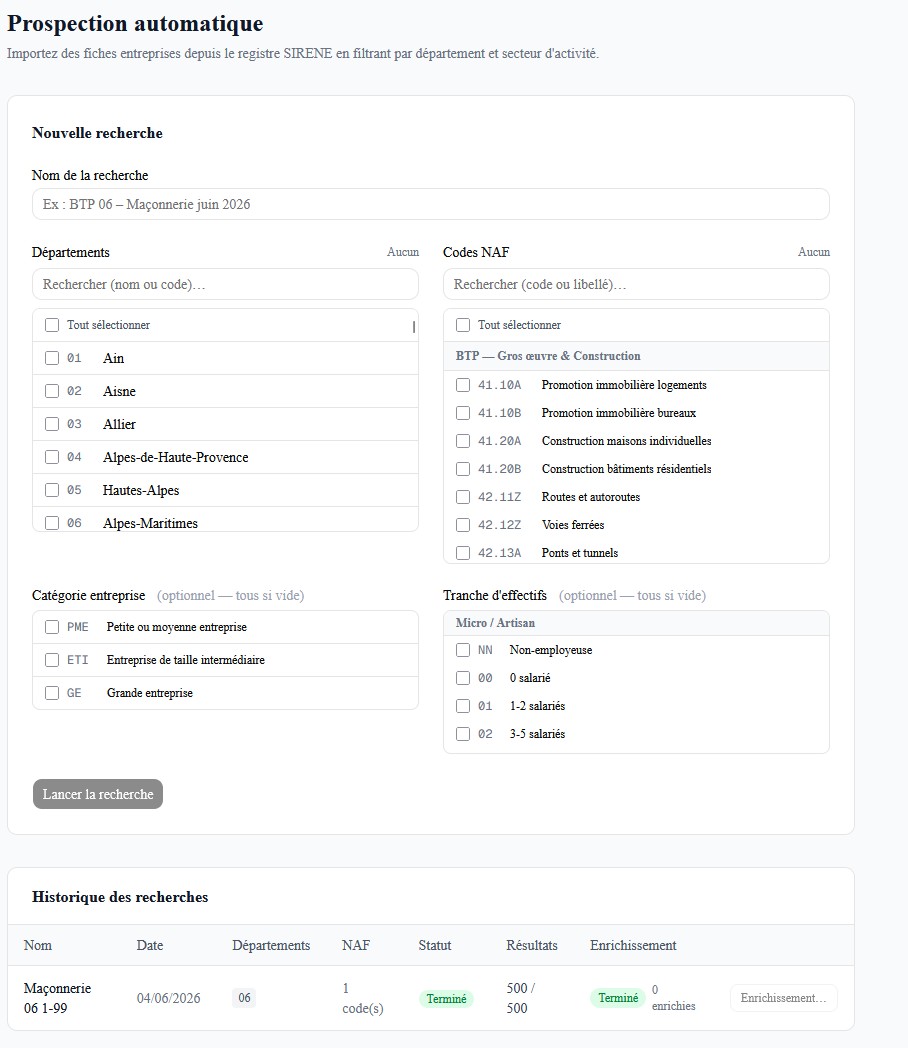
- Multi-department selection (101 departments)
- 80+ NAF codes organized by sector
- Filter by company category (SME / mid-market / large)
- Filter by headcount range (16 brackets)
- Job history with real-time status (auto-polling)
- "Re-enrich" button to re-run enrichment on existing records
Python script:
- Reads pending jobs from Supabase
- Calls SIRENE with deep pagination (cursor-based)
- Post-filters closed establishments
- Deduplicates by SIREN
- Enriches via Pappers
- Inserts in batches of 100 with duplicate detection by SIRET
Result: ~500 qualified construction prospects in department 06 in under 2 minutes.
That's the difference between a sales rep who starts their day with a ready-to-work list, and one who spends their morning building it.